
Browser-Based BIM: Rethinking the IFC Viewer with Bimvue
For years, opening a BIM model meant firing up a heavy desktop application, waiting for a multi-gigabyte file to load, and hoping your teammate had the same software — and the same version. Worse, the building data everyone actually needs (who owns a component, its status, its cost code, its specification) usually lived somewhere else entirely: a spreadsheet, an email thread, or someone’s memory.
We built Bimvue to close that gap: a browser-based IFC viewer and BIM data platform that keeps the model and its data in one place, reachable from a link. Here’s the thinking behind it — and why the browser is quietly becoming the right home for BIM.
First, what is IFC — and why it matters
IFC (Industry Foundation Classes) is the open, vendor-neutral file format for Building Information Modeling. It’s what lets a model authored in Revit, ArchiCAD, or Tekla be shared with everyone on a project without forcing them onto the same tool. If BIM is the industry’s shared language, IFC is the neutral dialect everyone can read.
But an IFC file is far more than 3D geometry. Every wall, duct, and beam carries structured data — properties, classifications, quantities, and relationships to other elements. That data is where the real value of BIM lives. It’s also the part most tools make hardest to actually use.
The desktop bottleneck
Traditional BIM viewers are desktop-bound, and that creates friction at every step:
- Software and hardware gates. Licenses to buy, installs to manage, versions to keep in sync, and workstations powerful enough to render a large federated model.
- Collaboration by export. Sharing the model means shipping files or trading screenshots — and the moment you do, everyone’s looking at a slightly different snapshot.
- Data that gets flattened or lost. The structured attributes that make BIM valuable are often stripped out, dumped into a spreadsheet, or trapped inside a tool most of the team can’t open.
- The people who need the model can’t see it. Field crews, reviewers, and clients frequently have no practical way to open an IFC at all.
Why the browser changes the equation
Modern browsers can render large 3D models directly with WebGL — no plugin, no install. That single shift removes most of the friction above:
- A link is the whole onboarding. Send a URL; the recipient is in the model in seconds, on a laptop or a tablet on site.
- Everyone sees the same, current model. There’s no “which version did you open?” — the source of truth is the one you’re all looking at.
- The model and its data live together. Geometry and structured attributes in one place, not scattered across files and spreadsheets.
What Bimvue does
A real 3D viewer, in the browser
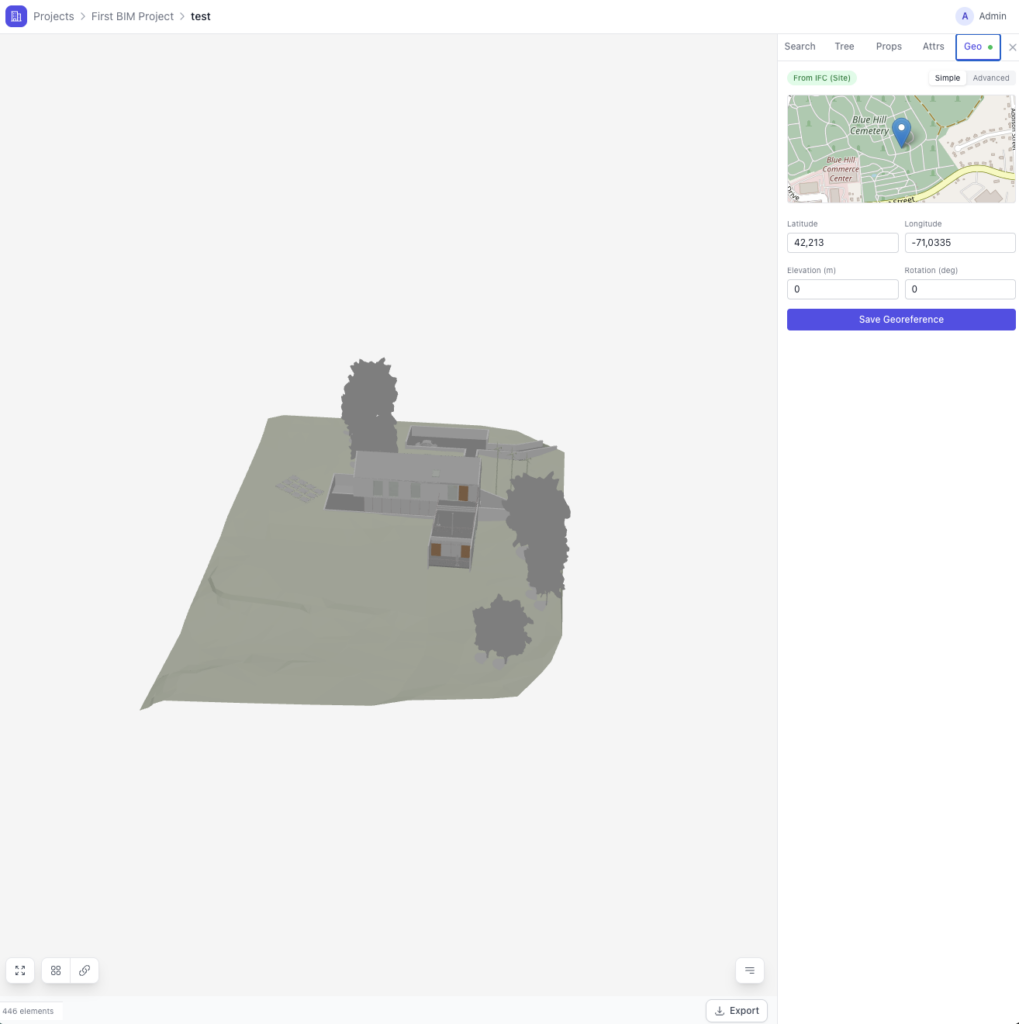
Orbit, pan, and zoom a full model; cut section planes to see inside; and isolate individual elements to focus on what matters. It runs in the browser with nothing to install, so anyone with the link can explore the model.
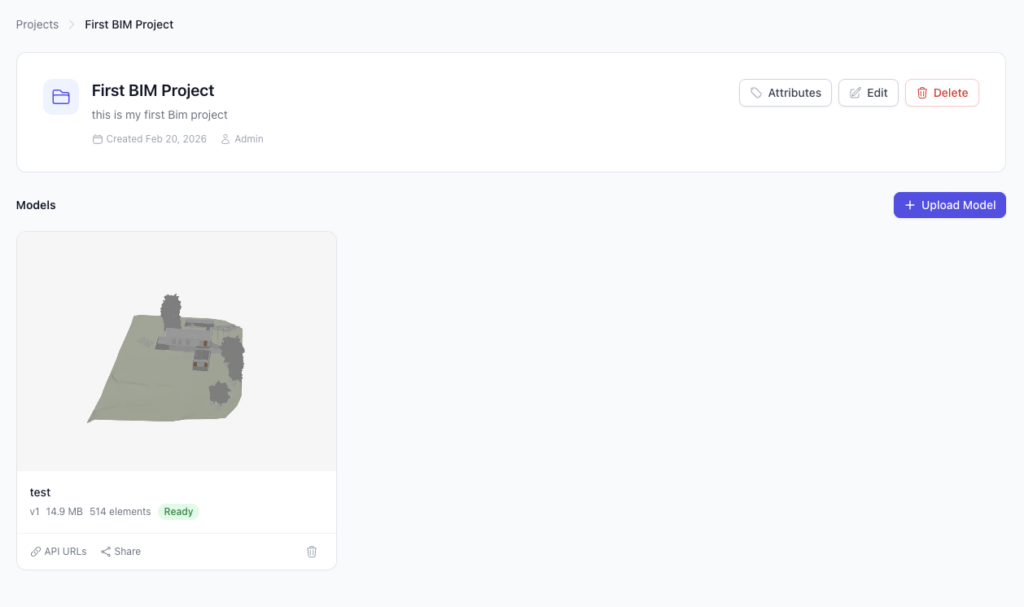
Upload an IFC, get a usable model
Bimvue handles IFC files up to 500 MB, with automatic geometry extraction and optimization so even large, federated models stay fast to navigate rather than grinding a workstation to a halt.
Your data, attached to the model — and durable
Define project-specific attribute schemas and tag elements with typed metadata: status, ownership, cost codes, whatever your project needs. Crucially, that information survives model updates, so re-exporting a new IFC revision doesn’t wipe out the data your team layered on top. This is the difference between a viewer and a data platform.
Built for teams
Invite team members with granular roles and permissions, with full tenant isolation so each organization’s models and data stay private. The model stops being a file that gets emailed around and becomes a shared, controlled source of truth.
Built on a modern, headless foundation
Under the hood, Bimvue follows the same principle we bring to every project: keep the data clean and structured, expose it through an API, and build a fast, modern frontend on top. WebGL does the rendering in the browser; an API-first backend owns the model data and access control. It’s a headless architecture — the same approach we use to decouple and modernize content platforms — applied to building information.
That structure isn’t just an implementation detail. It’s what makes everything above possible: fast viewing, durable custom attributes, and clean multi-tenant collaboration.
Where this is heading: structured building data is AI-ready
There’s a longer game here. The reason to keep building data structured and API-accessible isn’t only today’s collaboration — it’s tomorrow’s automation. Once a model’s elements and attributes are queryable through an API, you can start interrogating a building the way you’d query a database: which elements are missing a fire rating? what’s the total volume of concrete on level 3? which components changed between revisions?
A clash-riddled PDF or a screenshot can’t answer those questions. Structured, API-accessible BIM data can — and it’s exactly the kind of foundation that AI systems need to reason about the real world reliably. We’re building Bimvue with that future in mind: get the data right first, and the intelligent tooling has something solid to stand on.
Try Bimvue
Bimvue is currently in beta. If you work with IFC models — as a contractor, a design team, a QA specialist, or a project manager tired of shipping files around — upload a model, layer on the data your project needs, and share it with a link. See what it’s like to have your BIM models managed smarter.